Dataflow overview: Difference between revisions
Jump to navigation
Jump to search
No edit summary |
No edit summary |
||
| Line 13: | Line 13: | ||
*[[Dataflow overview - all components]] (least accessible) | *[[Dataflow overview - all components]] (least accessible) | ||
|Type=model | |Type=model | ||
|Querypart=[[Category: | |Querypart= | ||
{{#ask:[[Category:Component]][[FrameworkElementType::driver component]] | |||
|mainlabel= | |||
|format=ul | |||
|intro=<h2>Driver component (Scenario drivers)</h2> | |||
}}{{#ask:[[Category:Component]][[FrameworkElementType::pressure component]] | |||
|mainlabel= | |||
|format=ul | |||
|intro=<h3>Components</h3> | |||
}} | |||
{{#ask:[[Category:Component]][[FrameworkElementType::state component]] | |||
|mainlabel= | |||
|format=ul | |||
|intro=<h3>Components</h3> | |||
}}{{#ask:[[Category:Component]][[FrameworkElementType::impact component]] | |||
|mainlabel= | |||
|format=ul | |||
|intro=<h3>Components</h3> | |||
}}{{#ask:[[Category:Component]][[FrameworkElementType::response component]] | |||
|mainlabel= | |||
|format=ul | |||
|intro=<h2>Response components (Policy responses)</h2><h3>Components</h3> | |||
}} | |||
}} | }} | ||
Revision as of 16:36, 19 December 2013
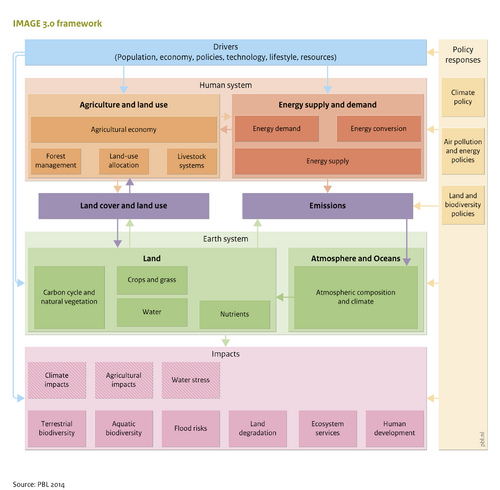

The dataflow overviews show how the framework components are related. In the dataflow overviews the input and output variables of the components are given. Click on an element of the dataflow overview, to get more detailed information about the corresponding variable or component.
- Dataflow overview - driver components
- Dataflow overview - pressure components
- Dataflow overview - state components
- Dataflow overview - impact components
- Dataflow overview - response components
A dataflow overview of all components of the IMAGE model can be found in the following link. Since it describes the whole model, it is the least accessible.
- Dataflow overview - all components (least accessible)
Driver component (Scenario drivers)
Components
Components
Components
- Aquatic biodiversity
- Ecosystem services
- Flood risks
- Human development
- Land degradation
- Terrestrial biodiversity
Response components (Policy responses)
Components